

Implementing Endpoint for Flows
This guide explains how to implement an Endpoint to power WhatsApp Flows. Please note that Flows with an endpoint are subject to both reliability and performance requirements. For additional information, refer to the Flows Health and Monitoring guide.Endpoint Examples
Basic Endpoint Example
We have created an endpoint example in Node.js that you can clone to create your own endpoint and quickly prototype your flow. Follow the instructions in the README.md file to get started. You can clone the example code from Github and run it in any environment you prefer.”Book an Appointment” Endpoint Example
We also provide endpoint code that can be used along with the “Book an Appointment” flow JSON template to complete the flow from start to finish. Follow the instructions in the README.md file to get started. You can clone the example code from Github and run it in any environment you prefer.Set up an Endpoint
Endpoints provide dynamic data for the screens and control routing, i.e. upon screen submission, the flow can make a request to the endpoint to get the name of the next screen and the data to display on it. Also, the endpoint can instruct the flow to terminate and control whether an outgoing message should be sent to a chat as a result of the flow completion. The endpoint can additionally provide a data payload to be passed with a completion message. Setting up an endpoint consists of the following steps:- Create a key pair and upload and sign the public key using On-Prem or the Cloud API.
- Setup the HTTP endpoint.
- Implement Payload Encryption/Decryption.
-
Link the endpoint to your flow:
- specify
data_api_versionin the Flow JSON and configure endpoint url, see reference for more details. - if the Flow was created through WhatsApp Manager, connect Meta App to it in “Edit Flow” page, see Flow Builder UI for more details.
- specify
Upload Public Key
Data exchanged with an endpoint is encrypted using a combination of symmetric and asymmetric encryption. You should have a key pair to enable encryption and upload the public key. It will be automatically signed along the way. Since Solution Partners manage multiple businesses, it’s recommended to have a dedicated endpoint and an encryption key pair for each WABA. Please ensure you have the versions specified below when signing the business public key.
Uploading and signing the business public key is different for On-Prem and Cloud, so depending on your API client please refer to the appropriate guide:
Sign and upload the business public key
You will need to re-upload public key in the following cases:
- When you re-register your number on On-Prem or Cloud API.
- When you migrate your number from On-Prem to Could API or vice versa.
- When you start receiving webhooks with alerts about client side errors
public-key-missingorpublic-key-signiture-verification.
Setup HTTP Endpoint
When the flow will need to exchange the data with your endpoint, it will make an HTTP request to it. You should set up a server and provide it’s url while configuring the flow, for example:https://business.com/scheduleappointment
Your server must be enabled to receive and process POST requests, use HTTPS and have a valid TLS/SSL certificate installed. This certificate does not have to be used in payload encryption/decryption.
Implement Encryption/Decryption
The body of each request contains the encrypted payload and has the following form: Sample Endpoint Request
After processing the decrypted request, create a response and encrypt it before sending it back to the WhatsApp client. Encrypt the payload using the AES key received in the request and send it back as a Base64 string.
You can reference the below examples of how to decrypt and encrypt.
If request can not be decrypted, endpoint should return HTTP 421 response status code (see Business Endpoint Error Codes for more details).
Sample Endpoint Response
Implement Endpoint Logic
Endpoint-powered Flows should avoid using the endpoint when it is not needed. This will reduce the latency for consumers and simplify the development of the Flow. Your endpoint will receive requests in the following cases:-
User opens the flow:
- If
flow_actionfield in the parameters that you pass to On-Prem or CAPI when sending a flow message isdata_exchange; - See Data Exchange Request for details.
- Tip: If the first screen of your flow does not have any parameters or the parameters are known when the message is sent, consider omitting
flow_actionto avoid calling your endpoint. You can supply parameters by using theflow_action_payload.datamessage field instead.
- If
-
User submits the screen:
- If
nameattribute specified insideon-click-actionfield in Flow JSON isdata_exchange; - See Data Exchange Request for details.
- Tip: If the next screen and its data are known already, consider setting the
on-click-actionname tonavigateto avoid calling your endpoint.
- If
-
User presses back button on the screen:
- If
refresh_on_backattribute specified in Flow JSON for the screen istrue; - See Data Exchange Request for details.
- Tip: If custom behavior when pressing the back button is not needed, consider omitting
refresh_on_backto avoid calling your endpoint.
- If
-
User changes the value of a component:
- If
on-select-actionfor the component is defined in Flow JSON.
- If
- Your endpoint replied with invalid content to the previous request (e.g. required field was missing), in this case consumer client will send asynchronous error notification request:
- Periodical health check from WhatsApp:
Data Exchange Request
Data exchange request is used to query the name of the next screen and data required to render it. Decrypted payload of the data exchange request will have below format. Sample Data Exchange Request Payload
After the request is received and decrypted, your business logic processes the request and determines which screen and data is to be sent back to the WhatsApp client. If user needs to be redirected to the next screen, next screen response payload should be sent. If flow needs to be terminated (e.g. because it’s completed), final response payload should be sent.
Next Screen Response Payload for Data Exchange Request
The following response payload is what the data channel needs to send back to the Whatsapp client during each data exchange, except the last one:
error_message in the data object as part of the response.
This will redirect the user to <SCREEN_NAME> and will trigger a snackbar error with the error_message present.
Final Response Payload
To trigger flow completion, send the following response to the data exchange request:
As a result, flow will be closed and a flow response message will be sent to the chat. See Response Message Webhook for additional details.
It is highly recommended that you manually send a summary message to the chat with consumer in response, such as the one below:
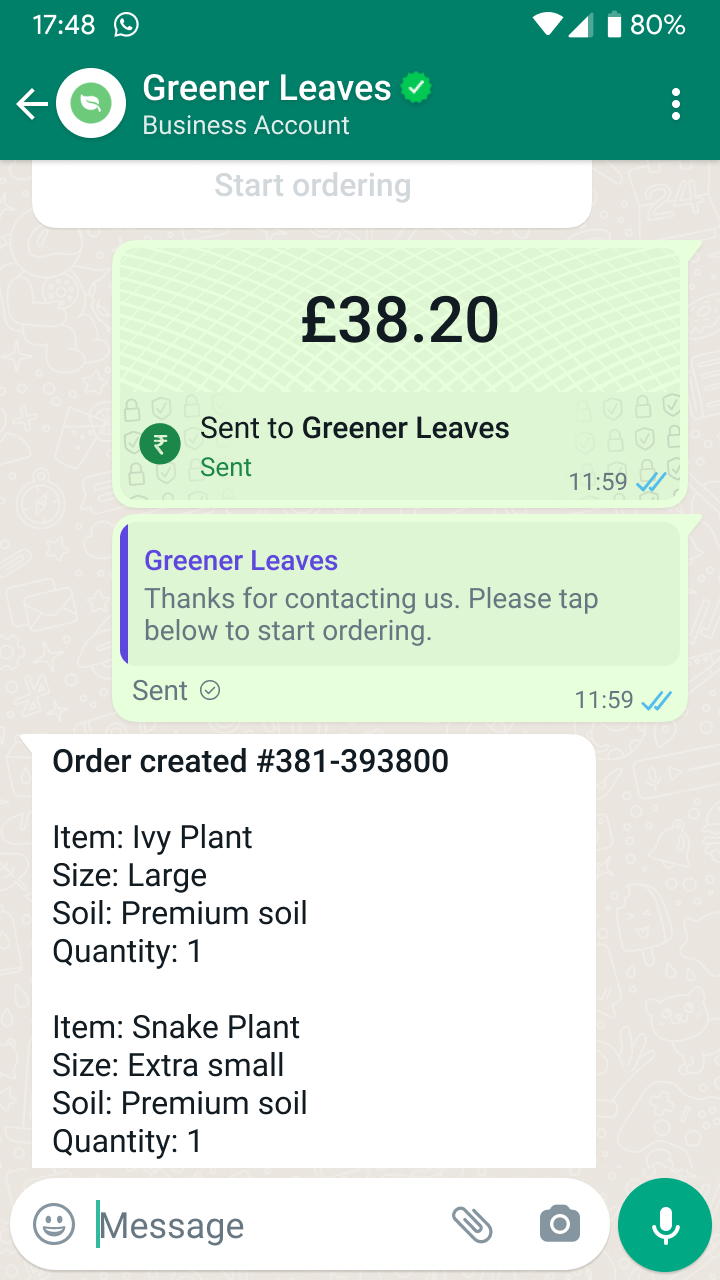 If you need parameters from the data channel for the message content, you can send them in the
 params field in addition to flow_token. All these parameters are forwarded to the messages webhook.
Error Notification Request
If you send a bad response payload to the WhatsApp client, you will receive a payload detailing the error and the error type. This provides you more visibility on failed client interactions so you can respond appropriately. Sample Error Notification Request Payload
Error Notification Response Payload
Send the following response payload to indicate that error notification was acknowledged:
Health Check Request
Endpoints should be able to respond to health check requests. WhatsApp may periodically send health check requests to the endpoints used by published flows. Sample Health Check Request PayloadRequest Signature Validation
When creating your app, decide who owns it and the endpoint, whether it is you or the Solution Partner. In order to prevent sharing of the app secret, the owners must be the same for both to use the app secret to validate the payload. You can verify that request is coming from Meta by checking signature which is generated using an app secret from the app connected to the flow. It is inferred from the user token when the flow is created through API, or selected manually in the Flow Builder when endpoint is added to the flow. Signature and Header Format We sign all endpoint requests with a SHA256 signature and include the signature in the request’sX-Hub-Signature-256 header, preceded with sha256=.
To validate the signature:
- Generate a SHA256 signature using the payload and your app secret.
- Compare your signature to the signature in the
X-Hub-Signature-256header (everything aftersha256=). If the signatures match, the payload is genuine.
Resetting the App Secret
If you need to reset the app secret without any downtime and without turning off payload validation, you may use below approach:- Allow the old app secret to continue generating the SHA256 signature for X hours
- Temporary consider
X-Hub-Signature-256header to be correct if it can be validated using either old or new app secret. - After X hours (not earlier), consider the signature in the
X-Hub-Signature-256header correct only if it can be validated using new app secret.
Flow token signature
flow_token_signature for enhanced endpoint authentication
To enhance the security and integrity of flow interactions, we are introducing a parameter called flow_token_signature. This signature allows businesses to verify the authenticity of the flow token received in the message payload.What is flow_token_signature?
The flow_token_signature is a JSON Web Token (JWT) created bty flows to securely sign the flow token using the Meta app secret as the secret key. This JWT includes a header specifying the signing algorithm (HS256), a payload containing the flow token. It enables businesses to verify the authenticity and integrity of the flow token received in the message payload, ensuring the token has not been tampered with during transmission.How to use?
The flow_token_signature is a parameter sent by flows and included in the data exchange request payload. Businesses can choose to use this signature to verify the authenticity of the flow token. To do so, businesses need to decode and verify the JWT using the Meta app secret, which is known to them. Once decoded, businesses can confirm that the flow_token value inside the token matches the expected value, ensuring the token has not been tampered with during transmission.Request Decryption and Encryption
The incoming request body is encrypted, you need to decrypt it first, then you need to encrypt the server response before returning it to the client. You can find code examples of decryption/encryption in various programming languages in the Code Examples section. For data_api_version “3.0” you should follow below instructions to decrypt request payload:-
extract payload encryption key from
encrypted_aes_keyfield:- decode base64-encoded field content to byte array;
- decrypt resulting byte array with the private key corresponding to the uploaded public key using RSA/ECB/OAEPWithSHA-256AndMGF1Padding algorithm with SHA256 as a hash function for MGF1;
- as a result, you’ll get a 128-bit payload encryption key.
-
decrypt request payload from
encrypted_flow_datafield:- decode base64-encoded field content to get encrypted byte array;
- decrypt encrypted byte array using AES-GCM algorithm, payload encryption key and initialization vector passed in
initial_vectorfield (which is base64-encoded as well and should be decoded first). Note that the 128-bit authentication tag for the AES-GCM algorithm is appended to the end of the encrypted array. - result of above step is UTF-8 encoded clear request payload.
- encode response payload string to response byte array using UTF-8
- prepare initialization vector for response encryption by inverting all bits of the initialization vector used for request payload encryption
-
encrypt response byte array using AES-GCM algorithm with the following parameters:
- secret key - payload encryption key from request decryption stage
- initialization vector for response encryption from above step
- empty AAD (additional authentication data) - many libraries assume this by default, check the documentation of the library in use
- 128-bit (16 byte) length for authentication tag - many libraries assume this by default, check the documentation of the library in use
- append authentication tag generated during encryption to the end of the encryption result
- encode the whole output as base64 string and send it in the HTTP response body as plain text
Handling Decryption Errors
If you can’t decrypt a request, you should send appropriate HTTP response code to force mobile client to re-download public key and retry the query. See endpoint error codes for additional details.Code Examples
A full example of a Node.js endpoint server is available here. Below are some examples demonstrating how request encryption/decryption can be implemented in different languages. The below code examples are only meant to demonstrate the encryption/decryption implementation and are not production ready.Python Django Example
Here’s a full code sample to handle a request with decryption/encryption in Python with Django framework. Note that the response is sent as a plain text string.NodeJS Express Example
Here’s a full code sample to handle a request with decryption/encryption in NodeJS with Express framework. Note that the response is sent as a plain text string.PHP Slim Example
Here’s a full code sample to handle a request with decryption/encryption in PHP with Slim framework. Note that the response is sent as a plain text string.Java Example
Here’s a full code sample to handle a request with decryption/encryption in Java 8+ using simple-json library: Please note that this example requires private key to be in unencrypted PKCS8 format, which is normally indicated by-----BEGIN PRIVATE KEY----- at the beginning of the file.
Depending on the way and exact software which you used to generate private key,
you may need to convert it to the required format first.
For example, if your key is in PKCS#1 format (starts with -----BEGIN RSA PRIVATE KEY-----) or PKCS#8 encrypted format (starts with -----BEGIN ENCRYPTED PRIVATE KEY-----), you can use below command to convert it to the unencrypted PKCS#8:
openssl pkcs8 -topk8 -inform PEM -outform PEM -nocrypt -in private.pem -out private_unencrypted_pkcs8.pem
C# Example
Here’s a full code sample to handle a request with decryption/encryption in C#. Note that the response is sent as a plain text string. View the full project code on github.Go Example
Here’s a full code sample to handle a request with decryption/encryption in Go. Note that the response is sent as a plain text string. View the full project code on github.NodeJS Script Demonstrating AES Key Encryption and Decryption
This NodeJS code sample aims to give an approximate example of howencrypted_aes_key field is calculated and how it can be decrypted.